Fanvue: The Complete Guide from Sign-up to Your First Earnings

In short: Fanvue is a subscription-based content platform where 80% of your revenue is yours — the commission is 20%. Sign-up is free, AI-generated content is officially allowed, and payouts arrive in USD by bank transfer from as little as $20. This guide walks you through every step from sign-up to your first payout, with concrete numbers.
What is Fanvue?
Fanvue is a content monetization platform, similar to OnlyFans: fans pay a monthly subscription for your content, and they can also spend on pay-per-view (PPV) messages, tips and custom requests. Over the past few years it has become one of the main homes for AI creators because — unlike many of its competitors — it officially allows AI-generated content, as long as you label it properly.
The key facts: the interface is in English, earnings are tracked in USD, and payouts go out by bank transfer to accounts in most countries. The minimum payout is just $20, so you don't have to wait months to see your first money. If you're at the very beginning and first want to understand the business model as a whole, read what AI OFM (AI OnlyFans Management) is — that's the big picture, this is the concrete step-by-step.
Why Fanvue and not OnlyFans?
- AI-friendly policy — AI-generated content is officially allowed, while OnlyFans restricts it far more strictly
- A more modern interface — better UX, nicer profile design, built-in AI tools
- The same commission — a 20% platform fee, so you don't pay extra for being AI-friendly
- Better analytics — more detailed stats on subscribers and revenue
- Less saturation — fewer creators, so it's easier to stand out
If you want a deeper look at how the two platforms differ, read our Fanvue vs OnlyFans comparison.
Commissions: Fanvue vs OnlyFans vs Patreon
Before you pick a platform, check how much each one takes from your revenue. The commission affects you for years: the same percentage works for or against you on every PPV you sell and every subscription that renews.
| Platform | Commission | You keep | Notes |
|---|---|---|---|
| Fanvue | 20% | 80% | AI content allowed, USD payouts from $20 |
| OnlyFans | 20% | 80% | AI content heavily restricted |
| Patreon | 5-12% | 88-95% | Lower commission, but not suitable for adult content, and a different audience |
On paper Patreon's commission is better, but adult or flirty AI model content doesn't work there — and between Fanvue's and OnlyFans' identical 20% commission, the AI policy tips the scales toward Fanvue. A simple example: if you bring in $1,000 in a month, Fanvue takes $200 and you keep $800. Keep that in mind when you set your prices — you always take home 80% of the list price.
Sign-up and verification, step by step
1. Create your account
Sign up on Fanvue with an email address and password, then choose the creator account option. Sign-up is free and doesn't require a card. Use an email address you'll keep long term — payout notifications go there too. Treat your username (handle) as permanent from day one: it becomes part of your profile link and you'll reference it in every TikTok and Instagram bio — renaming it later confuses your followers.
2. Creator verification (KYC)
Before you can use the money-making features, you need to pass an identity check. You'll need a valid photo ID (passport or ID card) and a selfie, which the system matches against your ID. A few practical tips to pass on the first try: do it in good light, avoid shadows on the ID, don't cover anything on it, and look the same in your selfie as in the photo (no sunglasses or hats). Important: even with an AI model, you verify with YOUR real details — the fictional character lives in the content, but you're the one legally responsible. Approval usually comes within 24-72 hours; if you're rejected, it's usually down to image quality or poor lighting, and you can try again.
3. AI creator label
If you work with AI-generated content, you need to indicate on your profile that you're an AI creator. That's not a disadvantage — Fanvue has a dedicated category for AI models, and buyers know exactly what they're getting. Skipping the label, however, puts your account at risk of suspension. We cover the legal framework (who's responsible, what's allowed and what isn't) in the legal questions around AI content.
4. Add your payout details
Under Settings, add your bank account details. Fanvue pays out in USD; your bank either converts the money to your local currency or you hold it in a USD or multi-currency account — we go into detail in our Fanvue payouts guide.
A profile setup that brings in subscribers
Your profile is the first — and often the only — impression. What to focus on:
- Profile picture + banner — your best, most distinctive images, in a consistent style
- Bio — 2-3 sentences about the character, with a hook (what does a subscriber get?)
- Free preview content — 3-5 SFW images that show the quality
- Pinned post — a welcome post that tells new subscribers what to expect
For detailed setup tips with examples, read our Fanvue profile optimization guide. A consistent face and style is crucial for an AI model — if the face changes from image to image, the illusion breaks; read more in our article on AI face swap technology.
Pricing strategy, with concrete numbers
The most common beginner mistake is overpricing. For your launch, we recommend this structure (estimates based on industry experience):
| Revenue stream | Recommended launch price | Why? |
|---|---|---|
| Monthly subscription | $5-8 | A low barrier to entry — the goal is to win subscribers, not instant profit |
| PPV message | $10-25 | This is where most of the revenue comes from — exclusive photo sets, custom content |
| Tips | optional | Extra revenue triggered in chat — you have to ask; it rarely comes on its own |
| Bundle discount | 3 months, 15-20% off | Longer commitment, less churn |
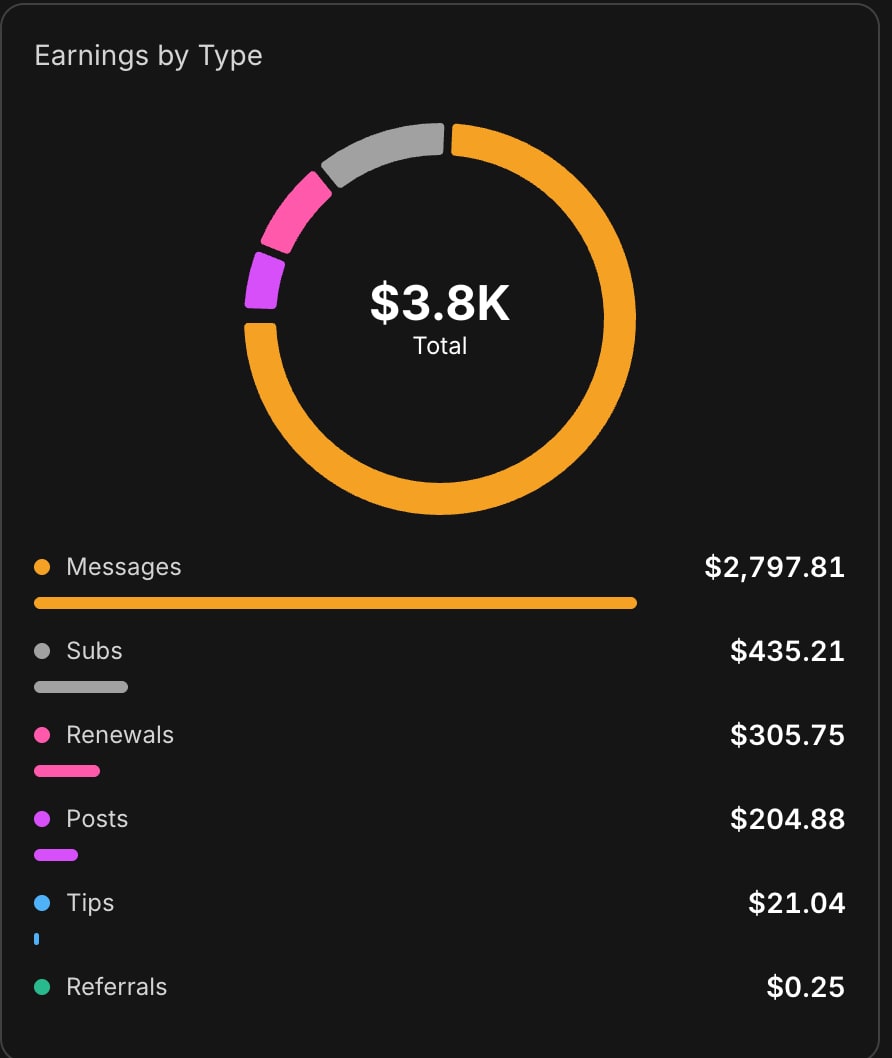
Why is the subscription so cheap? Because the real money doesn't come from subscriptions — it comes from PPV messages. In our documented first month, messages made up 74% of revenue ($1,114.81 out of $1,510.31). The subscription is just the entry ticket — the money is in the private chat. We've collected the exact technique in our PPV strategy guide, and the chat-side tactics in our Fanvue chatting strategy. Later, once you have 50-100 subscribers and can see the numbers, you can raise your subscription price too — but in the first months, volume and chat activity matter, not a high entry price.
When should you raise your price?
Pricing isn't a set-and-forget decision. A free or $5 entry fills your list quickly, and as trust and chat activity grow, you can raise it gradually. A proven sequence: $5 subscription plus aggressive PPV in month one, $8-10 for new subscribers in months two and three (existing subscribers keep their old price), and PPV bundle prices adjusted based on your tests. The point: early on, don't try to make money through the price — make it through volume and good offers.
Payouts: how you get your money
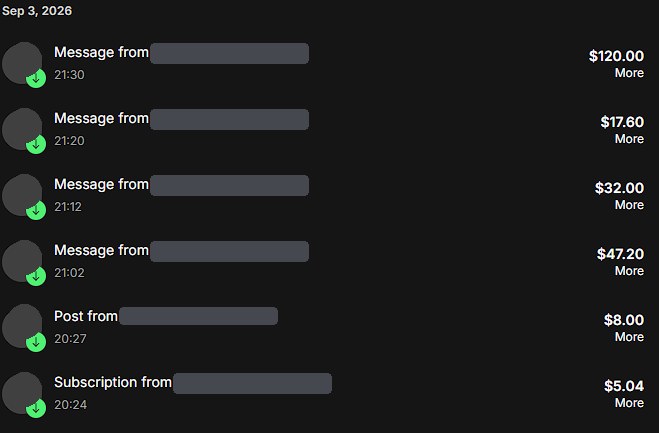
Fanvue tracks your earnings in USD and pays out by bank transfer. The key numbers:
- Minimum payout: $20 — reachable within your first active week
- Commission: 20%, so $80 of every $100 is yours
- Account: transfers work to bank accounts in most countries; a USD or multi-currency account saves you a forced conversion
- Currency: both tracking and payouts are in dollars — conversion to your local currency happens at your bank (or in your accounting)
Tax-wise, regular Fanvue income counts as business or self-employment income in most countries. Simplified small-business tax schemes can help, but some only cover income from private individuals — not payouts from a company like Fanvue Ltd — so check that yours applies. VAT exemptions for small businesses usually have a revenue threshold, above which VAT questions come up. We deliberately don't quote specific figures here: that's an accountant's job, and the rules change from time to time. Converting foreign-currency income (at which rate, and when) is also a question for your accountant. For every tax point, keep one thing in mind: check your local rules and confirm the details with an accountant before you start. You'll find the full process — payout settings, banking tips, tax basics — in our Fanvue payouts and withdrawals guide.
A typical first month: the weekly schedule
Here's what a realistic first month looks like when you start from zero:
| Week | Focus | Concrete tasks |
|---|---|---|
| Week 0 (prep) | Content bank + social accounts | Generate 30-50 images, create Instagram/TikTok accounts and warm them up following the warmup plan |
| Week 1 | Fanvue launch | Sign-up, verification, profile setup, upload 10-15 posts, dial in your pricing |
| Week 2 | Driving traffic | Daily posting on TikTok/Instagram, link in bio, landing your first subscribers |
| Week 3 | PPV and chat | A welcome message for every new subscriber, your first PPV bundles, testing mass messages |
| Week 4 | Analysis and fine-tuning | What sold and what didn't? Adjust prices, double down on your best-performing content types |
Most beginners fail in week 0 or week 2: either they don't have enough content ready before launch (then run out and stall), or there's nowhere for traffic to come from (they upload to Fanvue and wait for people to show up on their own — they won't). TikTok is one of the best free traffic sources; we've written up the detailed tactics in our TikTok strategy for AI content. This schedule is a condensed version of our own 17-step system — you'll find the full, day-by-day strategy in the 17 steps of the Fanvue Method.

How much can you realistically earn?
Let's be honest: most creators earn very little, because they upload a few photos and wait for a miracle. Creators who work with a system, though, can show measurable results. Our documented first month, starting from zero: $1,510.31 in total revenue — $1,114.81 from Messages/PPV, $184.88 from Posts, $168.86 from Subscriptions, $23.96 from Renewals and $17.80 from Tips. On the traffic side, our social accounts got 503K views, 19K profile views, 24K likes and 2,632 shares in 28 days.
It's one data point showing that with consistent work, real revenue is possible even in the first month. We break down the numbers and the daily time investment in our first-month case study, and realistic earning ranges in how much you can earn on Fanvue in 2026. For other creators' experiences, see our Fanvue reviews and experiences 2026.
How the AI OFM platform helps
Everything in this article is built into one system: the AI OFM platform tour shows how you get 1995 tested AI prompts (800 SFW + 1195 explicit), 12 locations, 53 poses, the 17-step Fanvue Method and the RunningHub workflows — with built-in AI image generation. If you don't know where to start with image generation, AI image generation for beginners is the place to begin.
Pricing is simple: the Starter plan is €0 (15 SFW prompts, to try things out), Insider is €59/month (1200 prompts = 800 core + 400 premium, the video workflow and the first 4 lessons of the video course, Telegram VIP, warmup plans), and Mogul is €200 for the first 3 months, then €69/month — Mogul includes everything: all 1995 prompts, the video workflow, the video course and personal support.
If you're ready, sign up free with the Starter plan and take the first step today.
Related articles
Frequently asked questions
Is signing up for Fanvue free?+
Yes, signing up for Fanvue is completely free and doesn't require a card. To create a creator account you need an email address, a password and an identity check (KYC): a photo ID and a selfie. Verification usually takes 24-72 hours, and after that you can start uploading content and earning right away.
How much commission does Fanvue take?+
Fanvue keeps 20% of your revenue as commission, so you keep 80% from every revenue stream — subscriptions, PPV messages and tips. That matches OnlyFans' commission, but Fanvue officially allows AI-generated content, which settles the platform choice for most AI creators.
How do I get paid?+
Fanvue tracks your earnings in USD and pays out by bank transfer to accounts in most countries. The minimum payout is $20, which you can reach in your first active week. With a USD or multi-currency account you avoid a forced conversion into your local currency. We cover payout settings and banking tips in detail in a separate article.
Do I need a business to earn on Fanvue?+
For regular income, usually yes: in most countries Fanvue earnings count as self-employment or business income. Simplified small-business tax schemes can help, but some only apply to income from private individuals, not payouts from a company like Fanvue Ltd. Small-business VAT exemptions usually have a threshold, too. Check your local rules and confirm the details with an accountant before you start.
Is AI-generated content allowed on Fanvue?+
Yes, Fanvue officially allows AI-generated content and even has a dedicated category for AI creators. The only condition is that you indicate on your profile that the content is AI-generated. Skipping the label puts your account at risk of suspension, so take care of it when you set up your profile.
What should I charge for a subscription at launch?+
As a beginner, start low, typically around $5-8. The subscription's job is to win subscribers, not to make an instant profit — most of the revenue comes from PPV messages. As your subscriber count and trust grow, you can raise the price gradually, while existing subscribers stay on their older price.
How soon can I make my first money?+
With consistent work, the first revenue usually arrives in week 2 or 3, once TikTok and Instagram traffic brings in your first subscribers and your PPV messages start going out. Our documented first month, starting from zero, came to $1,510, and 74% of it came from PPV messages. How much you make depends on how much work you put in.
Now see what it's like for real
You've read it — now put it to work. These are ready and waiting on the platform.
Available on a free account — no credit card needed. Sign me up
Follow along on social: