Fanvue vs OnlyFans: Which Should You Choose as an AI Creator in 2026?

In short: For AI creators in 2026, Fanvue is the better choice. Both platforms take a 20% commission, but Fanvue explicitly allows and supports AI-generated content, while OnlyFans only tolerates AI content tied to the verified creator's own likeness. In practice, Fanvue is the only one of the two where you can run a fully virtual AI model by the rules.
The two platforms in a nutshell
OnlyFans is the giant of the market: it has been around since 2016 and, according to industry estimates, has more than 300 million registered users and over 4 million creators. A huge brand and a huge paying audience — but its policy on AI content is strict, and its interface is stuck in the last decade.
Fanvue launched in 2021. It's much smaller, but it deliberately positions itself as the AI-friendly platform: it treats AI creators as their own category, offers a modern interface and detailed stats, and its policy explicitly allows virtual AI models. Both are subscription-based content platforms — revenue comes from subscriptions, PPV (pay-per-view) messages, posts and tips.
So the question isn't which platform is better in general, but which one fits your model. If you work with AI-generated content, the answer is clearer than you might think — let's look at the numbers.
Fanvue vs OnlyFans: a detailed comparison table
Here are the key decision factors side by side — we unpack the details after the table. The bold rows are the ones where the difference decides whether you can operate an AI model by the rules at all.
| Factor | Fanvue | OnlyFans |
|---|---|---|
| Commission | 20% (you keep 80% of revenue) | 20% (you keep 80% of revenue) |
| AI content policy | Explicitly allowed, a dedicated AI creator category | Only with the verified creator's own likeness |
| Virtual AI model | Allowed (labeled, with a real person behind the account) | Not allowed |
| Payout currency | USD | USD |
| Minimum payout | $20 | About $20 (depends on method and region) |
| Payout method | Bank transfer | Bank transfer |
| Audience size | Smaller but growing fast (estimate) | 300M+ users (industry estimate) |
| In-platform discovery | Limited, you need outside traffic | Practically none, you need outside traffic |
| Interface | Modern, clean, with AI features | Older, functional |
| Analytics | Detailed stats with a revenue breakdown | Basic |
| Verification | KYC: ID + selfie; a real person is required behind an AI account too | KYC: ID + selfie; only your own likeness can be monetized |
| Market position | AI-first challenger (since 2021) | Market-leading giant (since 2016) |
Commission and payouts: where do you keep more money?
On commission, it's a tie: both platforms keep 20% of revenue, so you get 80 cents of every dollar you earn. In a $1,000 month, that's $800 in net platform revenue — before taxes. The difference isn't in the percentage, it's in the details.
Fanvue payouts in practice
Fanvue tracks your earnings in USD — not in pounds, as many assume because it's a UK company. The minimum payout is $20, a very low threshold: you can withdraw money after your very first active week. Payouts arrive by bank transfer, to accounts in most countries. We've put together a step-by-step guide on how the dollars actually land in your account, and what to watch out for when converting currency, in Fanvue payouts and withdrawals.
OnlyFans payouts
OnlyFans also settles in dollars, with a similar minimum (roughly $20, depending on region and payout method) and bank transfers. So there's no real difference on the payout side — this isn't where you'll make your decision.
Tax-wise, revenue from either platform is taxable income. In most countries it counts as self-employment or business income; simplified small-business tax schemes can help, but some only cover income from private individuals — not payouts from a company like Fanvue Ltd. Small-business VAT exemptions also have a revenue threshold worth checking in time, because crossing it brings VAT obligations. Check your local rules and confirm the details with an accountant before you go live.
AI content policy: this is where the race is decided
This is the most important section of the article, because the difference here isn't subtle — it's categorical. If you work with an AI-generated model, choosing a platform isn't a matter of taste, it's a policy requirement.
Fanvue: an AI-first platform
Fanvue is deliberately building itself into the platform for AI creators. Its policy allows fully AI-generated virtual models, with three conditions: a verified, real person must stand behind the account (KYC: ID and selfie), AI-generated content must be labeled, and you can't use a real person's likeness without permission. Within those rules, the field is open — images, video, voice messages can all be AI-generated.
The platform also offers its own AI features for creators (such as AI-powered voice messages and message management tools — the lineup changes over time). The bottom line: here you can run a consistent-faced AI model of your own by the rules, without the risk of being banned. We cover likeness rights and other legal details in the legal questions around AI content.
OnlyFans: AI can only be a supplement
OnlyFans, by contrast, only tolerates AI as a supplement: under its policy, AI-generated content can only be uploaded if it depicts the verified creator's own real likeness and is clearly labeled. An AI model account depicting a fully virtual, non-existent person breaks the policy — OnlyFans can suspend such accounts, and your unpaid balance can get stuck.
So the AI OFM (AI OnlyFans Management) business model — building, managing and monetizing a virtual AI model — is a dead end on OnlyFans. Ironically, the platform the model is named after is exactly the one where you can't run it by the rules. Anyone who tries anyway puts their entire revenue stream at the mercy of a single moderation decision.
Why is the difference so stark?
The two policies reflect two different business logics. OnlyFans was built on real creators, and it's a brand risk for them if viewers can't tell whether they're talking to a real person or an AI character — that's why they tie AI to the creator's own face. Fanvue, on the other hand, is targeting the growing segment of AI creators and has shaped its rules accordingly: for Fanvue, an AI character is a legitimate content type, as long as a real, verified person is responsible for it and it's labeled for viewers. This difference is unlikely to reverse any time soon, so it makes sense to build your long-term platform where the policy works with you.
Verification and account security: what do both platforms ask for?
Both platforms require KYC (Know Your Customer) verification before you can monetize: a photo ID (ID card, passport or driver's license) and a live selfie for face matching. It usually clears within 1-2 days and works from most countries.
The decisive difference is AI again. OnlyFans ties the verified face to the content you can monetize — you can only sell the likeness that was verified. On Fanvue, the verified person doesn't have to be the face in the content: a real person stands behind the account and is responsible for it, but the character you present can be AI-generated, as long as you label it. That legal setup is what makes it possible to run an AI model fully by the rules. For protecting your account and avoiding bans over synthetic content, read AI content detection and how to avoid bans.
Audience size and discoverability
OnlyFans' audience is orders of magnitude larger — but that advantage is misleading. There's practically no in-platform discovery on OnlyFans: you have to bring viewers in yourself from TikTok, Instagram or Reddit. It's the same on Fanvue, so in both cases the real growth engine is outside traffic, not the platform's size. Put differently: 300 million users aren't 300 million potential subscribers for you — those viewers have already been won by other creators, and the platform won't put them in front of you.
Our traffic came from TikTok: 503K views, 19K profile visits, 24K likes and 2,632 shares in 28 days, starting from zero — we describe the exact method in TikTok strategy for AI content. Since you're bringing the traffic yourself anyway, what matters when picking a platform is the policy and the features, not the number of registered users. If you have an AI model, the policy safety behind Fanvue is worth more than OnlyFans' bigger crowd that you can't reach anyway.
Interface and stats: how well can you see your own business?
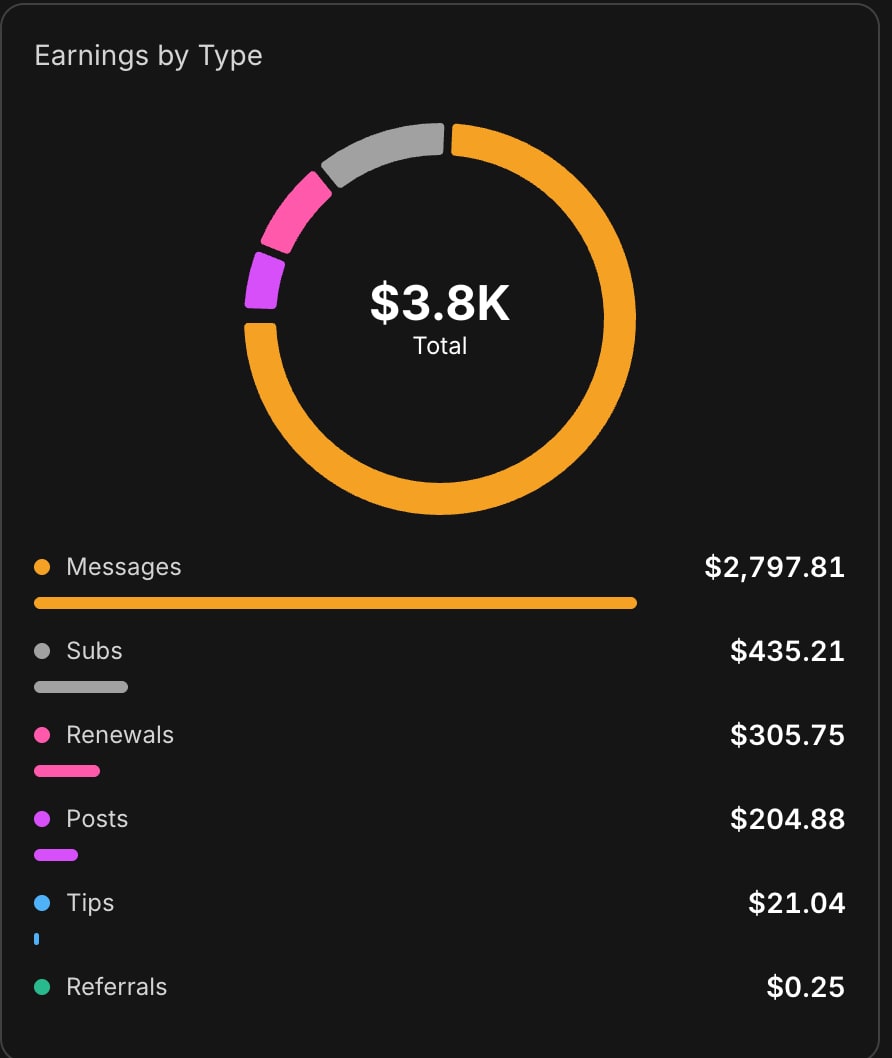
Fanvue gives you a modern, clean interface and detailed stats that show exactly whether your revenue comes from messages (PPV), posts or subscriptions. That's not cosmetic: if you know which revenue stream is performing, you can focus your energy there. In our $1,510 month, for example, it was clear that nearly 75% of the money came from private messages — and that number is what made us focus on our PPV strategy.
OnlyFans' stats are basic: you see the big numbers, but less of the breakdown you need for fine-tuning. In a data-driven AI OFM workflow that's a noticeable drawback, because it's harder to decide your next content move blind.
Which should you choose? Decision criteria
Choose Fanvue if...
- you work with an AI-generated model — that alone settles it, because virtual models are banned on OnlyFans;
- you're just starting and want a low barrier to entry: a $20 minimum payout, fast verification, a modern interface;
- detailed stats matter to you — Fanvue analytics show exactly whether revenue comes from messages, posts or subscriptions;
- you want to build long term on an AI-first platform, where the policy is on your side, not against you.
OnlyFans may be better if...
- you work with your own real likeness and use AI at most as a supplement (for retouching, for example);
- you already have a transferable audience that knows the OnlyFans brand and is used to paying there;
- you're in a niche where paying demand is demonstrably concentrated on OnlyFans.
Specific situations — what should you choose?
If you're a beginner with an AI model and no technical background: Fanvue, no question. If you have a real, existing OnlyFans audience and only want to use AI to speed up content creation with your own face: stay on OnlyFans, but stick to the own-likeness rule. If you're building a fully virtual character and want to scale it across several platforms: make Fanvue your core, with Patreon and Fansly as additional legs — not OnlyFans.
Important: as a real creator, the two don't exclude each other. With an AI model, though, even diversification stays Fanvue-centric — the additional legs point toward Patreon and Fansly. We cover this in detail in our Fanvue, Patreon and Fansly comparison, including how to layer the platforms on top of each other.
How to get started on Fanvue
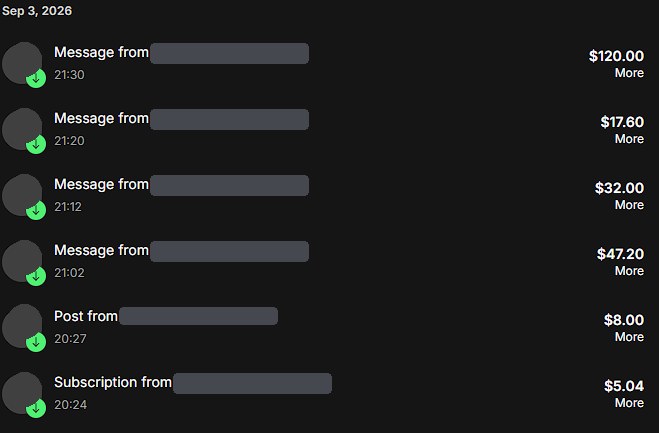
We run our own AI model on Fanvue: in its first month, starting from zero, it brought in $1,510.31. The breakdown is telling: $1,114.81 from messages and PPV, $184.88 from posts, $168.86 from subscriptions, $23.96 from renewals and $17.80 from tips — so nearly 75% of the money came from private messages, not the subscription fee. This is our only documented result, which is exactly why we show it line by line. You'll find other creators' experiences and the platform's weak spots in Fanvue reviews and experiences 2026.
- Sign up on Fanvue and complete verification (ID + selfie, usually 1-2 days).
- Set up your profile using the complete Fanvue guide: bio, pricing, welcome message, content calendar.
- Drive traffic from TikTok and Instagram, and build your strategy around messages (PPV), which bring in most of the revenue.
If you don't want to figure everything out from scratch: the AI OFM platform puts 1995 ready-made AI prompts (800 SFW + 1195 explicit), the 17-step Fanvue Method and ready-to-use RunningHub workflows in your hands — sign up here with the free Starter plan (15 SFW prompts). And if you have questions before paying for anything, message Akos directly on Telegram.
Related articles
Frequently asked questions
Which platform is better for AI-generated content: Fanvue or OnlyFans?+
For AI content, clearly Fanvue. It allows fully AI-generated virtual models, as long as a verified real person stands behind the account, the AI content is labeled and you don't use someone else's likeness. OnlyFans only allows AI content tied to the verified creator's own likeness — a virtual AI model account breaks its policy and puts you at risk of suspension.
How much commission do Fanvue and OnlyFans take?+
Both platforms take a 20% commission, so 80% of your revenue is yours. In a $1,000 month that's $800 in net platform revenue, before taxes. So commission isn't a deciding factor between the two — the real differences are the AI content policy, the interface and the stats. Check your local tax rules with an accountant.
Does OnlyFans allow AI-generated content?+
Only to a limited extent. On OnlyFans, AI-generated content can be uploaded if it depicts the verified creator's own real likeness and is clearly labeled. AI models depicting a fully virtual, non-existent person aren't allowed — such accounts can be suspended, and the unpaid balance can get stuck. For a virtual AI model, Fanvue is the compliant choice.
What currency does Fanvue pay in, and how?+
Fanvue tracks your earnings in USD (US dollars) — not in pounds, as many assume. The minimum payout is $20, and the money arrives by bank transfer to accounts in most countries. Talk to an accountant about currency conversion and taxes: in most countries this counts as self-employment income, and some simplified tax schemes don't cover payouts from a company.
Can I run the same AI model on both Fanvue and OnlyFans?+
Not by the rules. Fanvue allows virtual AI models, but OnlyFans only allows the verified creator's own likeness — an account for a non-existent AI character breaks its policy. If you want to diversify with an AI model, look at Patreon or Fansly alongside Fanvue, where AI content has a compliant framework.
Now see what it's like for real
You've read it — now put it to work. These are ready and waiting on the platform.
Available on a free account — no credit card needed. Sign me up
Follow along on social: