Fanvue Payouts: How to Withdraw Your Earnings in 2026

In short: Fanvue tracks your earnings in USD (US dollars), and 80% of your revenue is yours — the platform takes a 20% commission. Once your available balance reaches $20, you can request a payout by bank transfer, which usually arrives within 3-7 business days. It works with bank accounts in most countries, but receiving the money into a USD-capable account saves you the cost of double currency conversion. And in almost every country, Fanvue income is taxable business income — set it up properly and confirm the details with an accountant.
How does Fanvue pay you?
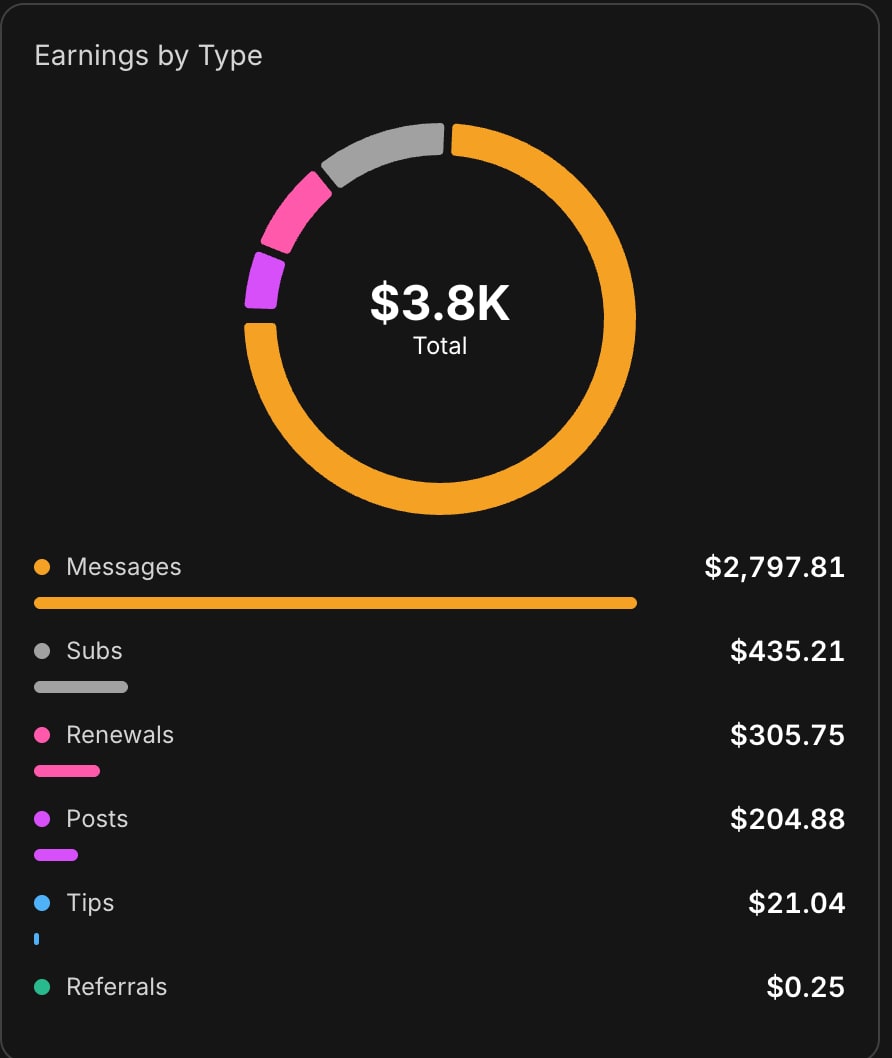
Let's start with the most important point, because a lot of people get it wrong: Fanvue tracks your earnings in USD — US dollars, not pounds and not euros. Even though the platform is run by a UK company (Fanvue Ltd), every subscription, PPV message and tip shows up in your stats in dollars, and payouts are calculated in dollars too. That's why we report our own results in dollars: in our first month we made $1,510.31 starting from zero — $1,114.81 from messages and PPV, $184.88 from posts, $168.86 from subscriptions, $23.96 from renewals and $17.80 from tips. You'll find the full breakdown, and the 503K views behind it, in how much you can earn on Fanvue in 2026.
The numbers to keep in mind:
- Commission: Fanvue takes 20%, so 80% of your gross revenue is yours
- Minimum payout: $20 — below that, your balance keeps building in your account
- Payout method: bank transfer to the account you provide
- Timing: usually 3-7 business days from your payout request, but plan for 5-10 days on your first payout
A quick example: if you make $1,000 gross in a month, Fanvue takes 20% ($200) and $800 is left. If you withdraw it with smart currency handling (more on that below), around $780 still lands in your account after a few percent in conversion costs. What remains to be paid — tax and social contributions — depends on where you live and how your business is set up.
If you don't have a Fanvue account yet, our complete Fanvue guide walks you through sign-up, verification and profile setup step by step.
How to set up Fanvue payouts, step by step
- Open Settings → Payouts in your Fanvue account.
- Enter your bank details: the account holder's name (exactly as it appears at your bank), your account number or IBAN, and the SWIFT/BIC code. You'll find all of these in your online banking.
- Fill in your personal details: name, address, date of birth. These are needed for identity checks and tax compliance — always use your real details, because a mismatch can get your payout held.
- Complete identity verification (KYC): a photo of your ID and a selfie, just like when you verified your creator account. No verification, no payout — so don't put it off, get it done on day one.
- Wait until your available balance reaches $20. New earnings start out as pending — the platform holds them for a few days to screen for fraud (chargebacks, for example) — and only then become available to withdraw.
- Request your payout — from here the money goes out by bank transfer and usually arrives within 3-7 business days.
Practical tip: test your first payout with a small amount before letting a big balance build up. If you mistyped a bank detail or the name doesn't match, only a small test transfer gets stuck instead of a large one — and you'll know the next one will go through smoothly.
How long until the money is actually in your account?
There are two separate waiting periods, and this is where many people panic for no reason:
- Pending period: new earnings stay pending for a few days before they become available. That's normal — every creator platform does this to protect against fraud (chargebacks, stolen cards). So your balance always has two parts: available and pending.
- Transfer time: processing your payout request plus the international bank transfer — usually 3-7 business days in total. Your first payout can be slower because of extra checks, up to 5-10 days.
Practical advice: if you've never requested a payout, don't wait for a big amount to pile up. Once the first payout has arrived, it becomes routine — many creators set a weekly or biweekly rhythm so money doesn't sit idle in their platform balance.

Payout options compared
Fanvue pays by bank transfer, but which account you receive the money into makes a real difference to the final amount. Here are the realistic options:
| Option | Account currency | Conversion cost (estimate) | Best for |
|---|---|---|---|
| Regular bank account in your local currency | EUR, GBP or your local currency | ~1-3% spread on the bank's own exchange rate | Small monthly amounts, when you don't want to open a new account |
| USD account at your own bank | USD | No forced conversion, but there may be account fees | Regular, larger payouts if you want to stay with your bank |
| Wise multi-currency account | USD, EUR, GBP and more in one | ~0.4-0.6% fee at the mid-market rate | The best value for most creators |
| Revolut | USD, EUR, GBP and more in one | Close to mid-market on weekdays, a markup on weekends | If you already have Revolut and convert on weekdays |
The costs in the table are estimates — exact fees vary by bank and plan, so always check the current fee schedule. The key point: the fewer conversion steps between the dollar and the currency you finally spend, the less you lose on exchange rates. If you live in the US and bank in dollars, conversion isn't an issue at all — just check whether your bank charges a fee for incoming transfers.
Currency conversion: receive USD, EUR or your local currency?
The double-conversion trap
If you have your dollar earnings paid into an account in another currency, the money can easily be converted twice on the way (for example USD → EUR → your local currency), and you lose on the exchange rate at every step. Above $1,000 a month this really starts to hurt: a 2-3% difference can add up to several hundred dollars a year — roughly a full week of earnings, leaked away in conversions.
EUR or USD account — which should you choose?
Since Fanvue works in dollars, the cleanest setup is to receive the money into a USD account and convert to your own currency on your own schedule. If your bank doesn't offer a convenient USD account, a multi-currency account is still better than an automatic conversion straight into your local currency — but remember that USD → EUR is a conversion step too. In practice, most creators find it easiest to hold dollars in a multi-currency account (Wise, Revolut) and convert when the rate is good or when they actually need the money.
What to do
- Wise: you can open a USD balance with its own account details, and convert incoming dollars at the mid-market rate with a low fee whenever the rate suits you.
- Revolut: similar logic — convert on weekdays, because weekend conversions come with a markup.
- A USD account at your bank: if you'd rather stay with your usual bank, a USD account still beats an automatic conversion into your local currency.
Important: for business income, your accountant will want your cash flow to be transparent — agree in advance how to treat your Wise or Revolut account in your books (personal or business account).
Taxes: how to report your Fanvue income
Fanvue income is taxable income — there's no way around it, and it isn't worth trying, because bank transfers are easy to trace. The good news: once it's set up properly, it isn't complicated. The points below are general guidance; tax rules differ from country to country, so check your local rules and confirm the details with an accountant — they depend on your personal situation.
Treat it as a business
Fanvue income comes from a regular, ongoing activity, so in most countries it counts as self-employment or business income, not a hobby. In the US, that typically means reporting it as self-employment income and paying self-employment tax on top of income tax. In the UK, you'd usually register as a sole trader and file a Self Assessment return. Across the EU, the usual route is registering as self-employed or as a sole proprietor under your country's rules. Many countries also offer simplified schemes for small businesses (flat-rate or lump-sum taxation, where part of your revenue is automatically treated as expenses) — for many beginners these are the simplest and cheapest option, but which one fits you depends on your other income, such as a day job or student status.
Check that your tax scheme actually covers Fanvue
Simplified tax schemes often come with conditions. Some, for example, only apply to income received from private individuals — but your payer is a company, Fanvue Ltd, so a scheme like that wouldn't cover your Fanvue income. Getting this wrong can lead to a hefty back-tax bill later, so clear it up with your accountant before you start. And don't trust forum posts quoting rules from years ago — tax rules change.
VAT and sales tax
In many countries, small businesses can stay exempt from VAT (or sales tax) below an annual revenue threshold. Below it, you don't charge VAT — but tracking the threshold and handling what happens when you cross it is typically your accountant's job, and both the amount and the rules can change. Because you're providing a service to a foreign company, a VAT ID and reverse-charge rules may also come into play — again, something your accountant will sort out. We cover the legal and admin side in more detail in the legal questions around AI content.
Invoicing Fanvue Ltd (UK)
In many countries, a self-employed person has to back up business income with invoices. In practice, it looks like this:
- You invoice Fanvue Ltd, a company registered in the United Kingdom — you'll find the exact billing details (company name, address, registration number) on Fanvue's site and in your payout statements.
- It makes sense to issue invoices in USD, since Fanvue works in dollars — if your local rules require it, your invoicing software converts the amount at the official exchange rate of the day.
- If you're based in the EU: since Brexit, the UK is a non-EU country, so for VAT purposes your service usually falls outside the scope of your local VAT — the invoice carries a corresponding note. Your accountant will tell you the exact wording.
- How often you invoice (per payout or monthly) is something to agree on with your accountant. What matters is that your Fanvue payout statements and your own invoices add up in the end.
This is the part where you really shouldn't improvise: foreign-currency invoicing, exchange rates, VAT IDs and the territorial scope of VAT are all topics where you should confirm the details with an accountant — a good one will take all of it off your plate for a modest monthly fee, and you'll sleep better for it.
Common payout mistakes — and how to avoid them
- Different names on your bank account and your Fanvue account — the payout gets stuck or bounces. Always use your legal name, exactly as on your ID, in both places.
- Putting off KYC — the money keeps piling up, but you can't withdraw it without verification. Get it done on day one.
- Receiving dollars into a local-currency account — double conversion, needless losses. Above $200-300 a month, it's worth using Wise or a USD account.
- The "I'll sort out taxes later" mindset — international transfers are visible, and fixing things after the fact is always more expensive. Have your business registration and accountant in place before your first payout.
- Only cutting costs instead of growing revenue — optimizing the revenue side brings in far more than saving on conversion fees. Our PPV strategy guide helps with exactly that.
Summary: withdrawing is the easy part
Fanvue payouts work smoothly from most countries: your earnings build up in USD, you can request a bank transfer from $20, and with smart currency handling the vast majority of your revenue really does end up with you. After the 20% commission and a few percent in conversion costs, you can count on roughly 75-78% of your gross revenue — your accountant will work out the exact tax based on your setup.
The hard part isn't withdrawing the money — it's earning it. If you need a system for that, the AI OFM platform gives you 1995 ready-made AI prompts, the 17-step Fanvue Method and built-in AI image generation in the AI Studio — sign up here. You can open a Fanvue account with this link, and if you have questions, message Akos directly on Telegram.
Related articles
Frequently asked questions
What is the minimum payout on Fanvue?+
The minimum payout on Fanvue is $20. Until your available balance reaches that amount, your earnings keep building in your account and you can't request a payout. New earnings are pending for a few days before they become available to withdraw, so your balance always has two parts: an available amount and a pending amount.
What currency does Fanvue pay in?+
Fanvue tracks your earnings in USD (US dollars) and calculates payouts in dollars too, even though the platform is run by a UK company. Payouts arrive by bank transfer. If you give a bank account in another currency, your bank converts the money at its own rate, so for larger amounts it's worth using a USD-capable account such as Wise to avoid double conversion.
Do I need to register a business for Fanvue income?+
In most countries, yes. Fanvue income comes from a regular, ongoing activity, so it usually counts as self-employment or business income rather than occasional income. In the US that typically means self-employment income, in the UK registering as a sole trader, and in the EU registering as self-employed. Confirm the exact setup with an accountant, because it depends on your situation.
Do I have to pay taxes on Fanvue income?+
Yes. Fanvue income is taxable in almost every country, and bank transfers are easy to trace, so set aside part of every payout for taxes. Simplified small-business tax schemes can lower your burden, but check that they actually cover income from a foreign company, because some only apply to payments from private individuals. Your accountant can calculate what you'll owe.
How long does a Fanvue payout take to reach my bank account?+
Usually 3-7 business days from your payout request. Your first payout can be slower because of extra checks (KYC, bank detail verification), up to 5-10 days, so it's worth testing with a small amount first. On top of that, new earnings have a pending period of a few days before they can be withdrawn at all.
Now turn it into money
You've read it — now put it to work. These are ready and waiting on the platform.
Available on a free account — no credit card needed. Sign me up
Follow along on social: